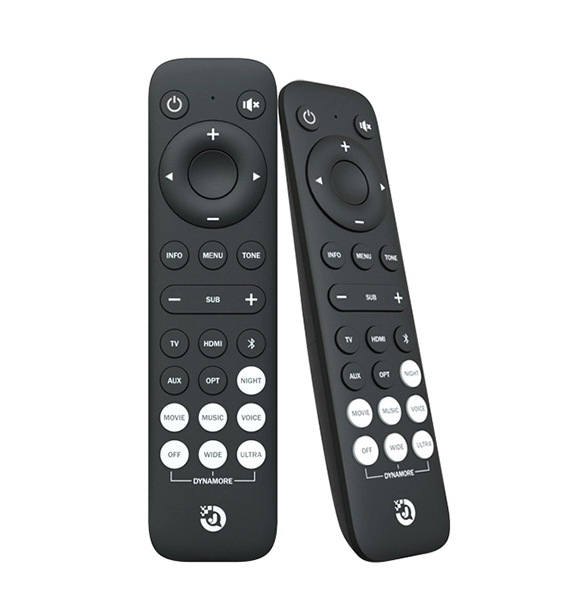
Introduction: Elevate Your Home Theater Experience
Creating an immersive home theater experience is more than just buying a projector or premium speakers—it’s about seamless control, efficiency, and convenience. A universal projector remote is one of the most practical tools to achieve this. Jiechuang Shinco Electronics, headquartered in Shenzhen, specializes in high-tech universal remote controls, including infrared and Bluetooth models, compatible with projectors, TVs, audio systems, set-top boxes, and small appliances.
Using a universal remote not only simplifies your entertainment system but also unlocks advanced features, faster control, and improved workflow. This guide explores five practical tips to supercharge your home theater, complete with performance comparisons, setup guides, and maintenance advice.
Tip 1: Consolidate All Devices into One Remote
Multiple remotes clutter your space and slow down operation. A universal projector remote lets you:
-
Replace multiple remotes with a single device
-
Switch seamlessly between projectors, audio systems, and streaming devices
-
Reduce desk or coffee table clutter
Performance Comparison Table – Universal Remote vs Traditional Remotes
| Feature | Universal Remote (Jiechuang Shinco) | Traditional Remote | Advantage |
|---|---|---|---|
| Device Coverage | Projectors, TVs, Sound, Set-top Box | Single Device | Multi-device control |
| Setup Time | 5–10 minutes | 30+ minutes | Faster setup |
| Macro Functionality | Yes | No | Automation |
| Voice Control | Bluetooth models | No | Hands-free operation |
Tip 2: Leverage Shortcuts and Macro Functions
Modern universal remotes support macro programming, which allows you to:
-
Power on multiple devices simultaneously
-
Switch input sources instantly
-
Adjust volume, brightness, and contrast with one button
Setup Steps for Macro Programming:
-
Identify devices to control
-
Assign commands to a single programmable button
-
Test macro sequence and adjust timing if needed
-
Save and label the macro for easy access
Using macro functions can reduce repetitive tasks, making your home theater experience faster and smoother.
Tip 3: Ensure Compatibility Across Devices and Brands
Compatibility is key. Universal projector remotes work with:
-
Projectors from multiple brands
-
AV receivers, soundbars, and smart hubs
-
Streaming devices and set-top boxes
Compatibility Performance Table – Infrared vs Bluetooth Remotes
| Feature | Infrared Model | Bluetooth Model |
|---|---|---|
| Line-of-Sight Requirement | Yes | No |
| Range | Up to 10m | Up to 20m |
| Multi-device Simultaneous Control | Limited | Yes |
| Voice Control | No | Yes |
Jiechuang Shinco Electronics offers both IR and Bluetooth universal remotes, ensuring wide-ranging compatibility.
Tip 4: Optimize Placement and Signal Reception
Proper placement ensures uninterrupted control:
-
Keep the remote within line-of-sight for IR models
-
Minimize obstacles and interference for Bluetooth models
-
Consider remote extenders for devices in cabinets or different rooms
Layout Suggestion for Home Theater Setup:
-
Projector mounted on ceiling or rear wall
-
IR receiver on projector front panel unobstructed
-
Remote charging or battery compartment accessible
-
Optional Bluetooth remote for secondary room control
Proper setup guarantees smooth device operation without lag or missed commands.
Tip 5: Maintain and Update Your Universal Remote
Longevity and reliability are crucial. Steps include:
-
Replace batteries regularly to prevent interruption
-
Clean buttons and sensors to maintain responsiveness
-
Update firmware for Bluetooth models to expand device compatibility
-
Test macro sequences periodically to ensure flawless operation
Maintenance keeps your remote operating like new and avoids downtime during important viewing events.
Bonus Tip: Enhance Control with Voice Commands
Bluetooth universal remotes from Jiechuang Shinco support voice input, enabling:
-
Quick power-on/off for all devices
-
Volume and source adjustments hands-free
-
Menu navigation without manual control
This feature transforms your home theater into a smart, effortless entertainment hub.
FAQ: Universal Projector Remote Insights
-
Q: Can a universal remote really control all my devices?
A: Yes. Jiechuang Shinco remotes come pre-programmed for a wide range of devices and support additional custom codes. -
Q: What is better for my setup, IR or Bluetooth?
A: Infrared is ideal for line-of-sight devices, while Bluetooth extends range and supports voice control. -
Q: How do I program macros?
A: Assign sequential commands to a single button following the setup instructions, then test and adjust timing. -
Q: Will it work with older projector models?
A: Yes. Jiechuang Shinco remotes support legacy projectors as well as the latest models. -
Q: Can it control devices in another room?
A: Bluetooth models and IR extenders allow multi-room operation, ideal for larger home theaters.
Conclusion: Maximize Your Home Theater Experience
A universal projector remote simplifies control, improves efficiency, and enhances overall home theater enjoyment. By following these five practical tips and leveraging Jiechuang Shinco Electronics’ advanced IR and Bluetooth remotes, you can:
-
Consolidate multiple devices into one controller
-
Automate repetitive actions with macros
-
Ensure compatibility with any projector or device
-
Optimize signal and placement
-
Maintain longevity with proper care
With a universal remote, your home theater becomes smarter, more convenient, and fully immersive.
en.remote-jcxk.com
Shenzhen Jiechuang Shinco Electronics Co.,Ltd.
About Author


More Stories
2026 LED Matrix Module Buying Guide: Specs Over Price Lists
SiC Coating Halfmoon Graphite Parts: A 2026 Buyer's Guide
Planning a Custom LED PCB: From Circuit Design to Manufacturing